Why your og:image isn't showing on X, Slack, or Discord (a debugging checklist)

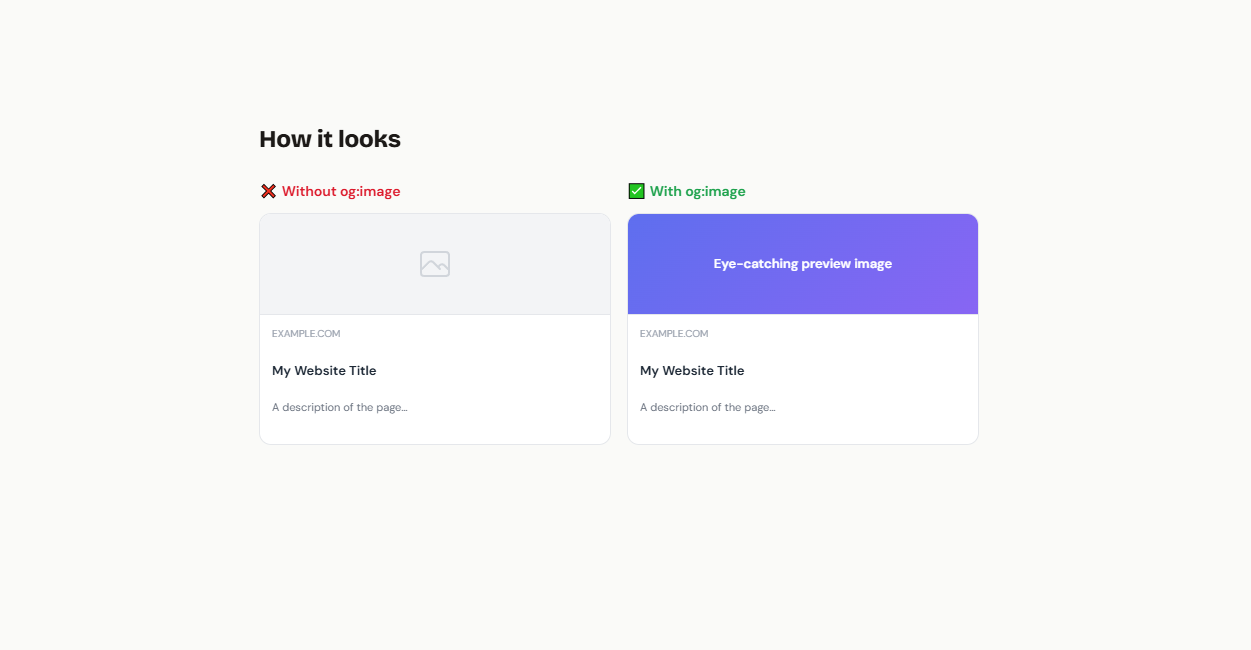
You added the og:image meta tag, you shared the link, and the preview is still the dead gray card. Every platform fails slightly differently and most of them cache aggressively, so guessing is slow. Here's the checklist I actually use, roughly in order of how often each one turns out to be the problem.
First: look at what the crawler sees, not what you see
Crawlers don't use your browser. Fetch the page the way they do:
# what X sees
curl -s -A "Twitterbot/1.0" https://your-site.com/post/ | grep -i "og:\|twitter:"

# what Facebook sees
curl -s -A "facebookexternalhit/1.1" https://your-site.com/post/ | grep -i "og:"

# and fetch the image itself as a crawler
curl -sI -A "Twitterbot/1.0" https://your-site.com/img/og.png
If the meta tags or the image don't come back from those commands, no amount of re-sharing will fix the preview. Work through the checklist below. If they do come back correctly, skip to the cache-busting section at the end, because your problem is almost certainly a stale platform cache.
1. The URL isn't absolute
content="/img/og.png" fails on several platforms. The spec wants a full absolute URL, scheme and all:
<meta property="og:image" content="https://your-site.com/img/og.png">
This is the single most common cause. Check it first, feel no shame.
2. robots.txt is blocking the image
Twitterbot respects robots.txt, and so do several other preview crawlers. If your image lives under a disallowed path, X will silently show no card at all. Watch out for broad rules like:
Disallow: /assets/
Disallow: /api/
If your OG images are served from a blocked path, either move them or add an explicit Allow for that path. If you use a service that generates images from an API route, make sure your robots.txt doesn't block that route.
3. The meta tag isn't in the raw HTML
Most preview crawlers do not execute JavaScript. If your framework injects meta tags client-side (a React SPA setting tags in a useEffect, for example), the crawler sees the pre-JS HTML with no og:image in it. The curl test above catches this immediately: if grep finds nothing but view- source in your browser shows the tag, JavaScript is putting it there too late. Meta tags must be server-rendered or baked in at build time.
4. Missing twitter:card
X won't render a large preview from Open Graph tags alone. Without this tag you get the small thumbnail card or nothing:
<meta name="twitter:card" content="summary_large_image">
5. The image is the wrong size, weight, or type
The constraints that actually bite:
- Facebook: images smaller than 200×200 are rejected; under 600×315 they render as a small square instead of a large card. Max 8 MB.
- X: max 5 MB. Minimum 300×157 for
summary_large_image. - Everyone: the safe target is 1200×630 (1.91:1). SVG doesn't work anywhere that matters; use PNG or JPEG.
Also verify the response Content-Type is actually image/png or image/jpeg. An error page served with a 200 status and text/html looks fine in the browser and fails everywhere else. The curl -sI command above shows you both.
6. The image responds too slowly
Preview crawlers give up after a few seconds. If your image is generated on demand and the first render takes too long, the crawler times out and caches the failure. This hits dynamically generated OG images hardest: the render has to complete within the crawler's patience on the very first fetch.
If you're generating images dynamically, whatever renders them needs to answer the first hit in a couple of seconds and serve every subsequent hit from a cache. (Disclosure: this problem is why I built Shotpipe, a hosted OG image API where the render happens once on the first crawler hit and is cached at the CDN forever after. Any well-cached self-hosted setup passes this test too; the point is that the first fetch is the one that counts.)
7. Redirects and mixed content
Some crawlers follow one redirect, some follow none, none of them like redirect chains. Point og:image at the final URL. And an http:// image on an https:// page fails on several platforms; everything should be HTTPS.
8. Multiple og:image tags
If your layout emits a default image and your post adds a specific one, some platforms take the first tag, some the last. Emit exactly one og:image per page and the ambiguity disappears.
Forcing a re-scrape, platform by platform
If the tags and image are correct now but the preview is still wrong, you're looking at a cached scrape of the broken version. Each platform clears it differently:
- Facebook: Sharing Debugger, paste the URL, hit "Scrape Again". Also the fastest way to see why Facebook rejected an image.
- LinkedIn: Post Inspector, inspecting a URL refreshes its cache.
- X: there's no manual purge anymore (the old Card Validator preview is gone). The cache expires on its own after roughly a week.
- Slack and Discord: both cache hard and offer no official purge.
- Telegram: message the URL to
@WebpageBotand it will offer to update the preview.
The universal workaround for the platforms with no purge button: change the URL. Add a throwaway query parameter to the image URL (og.png?v=2), rebuild, and every platform treats it as a brand-new resource. This is also the argument for content-derived image URLs: if the URL changes whenever the image content changes, stale caches can't happen by construction.
The five-minute version
curlthe page and the image asTwitterbot; believe what comes back.- Absolute URL, exactly one
og:image,twitter:cardpresent. - robots.txt allows the image path.
- 1200×630 PNG/JPEG, under 5 MB, correct
Content-Type, no redirect chain. - First fetch answers in a couple of seconds.
- Still broken? It's a cache. Re-scrape or version the URL.
Work the list top to bottom and you'll find it. It's always one of these.